
A backup is only proven once it can be restored. On the backup server (Linux) bkp_pruefrestore restores runs as a test, checks and counts their file systems and starts their VMs in an isolated sandbox. The backups themselves stay unchanged. Every step is a job of its own in the target scheduler; the jobs are linked with after= and share the folder --path, in which the first step creates the manifest pruefrestore.json. There is no default job: the operator sets up the chain, the template is in bkp_target_sched.cfg.example, and the target console offers every step under “New... → Template”.
11.1 The steps#
| Command | What it does |
|---|---|
| pruef-restore | restores the run that has just arrived (on=backup-success, --store {store} --run {uuid}) or, by schedule, the newest run of every backup (--latest) or a sample (--sample <n>) from --search-dir; checks the free space beforehand |
| pruef-fsck | checks every file system read-only: ext2/3/4, xfs, btrfs, vfat, ntfs, also in LVM volumes; encrypted ones (BitLocker, LUKS) are skipped |
| pruef-mount | mounts them read-only below --mount-point |
| pruef-count | counts folders, files and bytes, reads every file with its checksum and compares with the last check of the same backup (options and findings below); if it follows a partition directly, it mounts it itself |
| pruef-virus | checks the files of the mounted file systems for malware with ClamAV, read-only; with --changed-only only what is new since the last check (section “Checking for viruses”) |
| pruef-vm-start | starts the VMs (Proxmox, Xen, Hyper-V) and whole disks with a partition table in QEMU, checks after --wait with --check running, screen or agent and takes a screenshot |
| pruef-vm-stop | shuts the VMs down, after --timeout it switches them off |
| pruef-unmount | unmounts everything |
| pruef-delete | deletes the restored images (--force: stops and unmounts itself beforehand) |
pruef-fsck, pruef-mount and pruef-count work with all disks of the check restore unless told otherwise. With --disk <disk> (as bkp_pruefrestore status names it, for example scsi1 or disk) they take only this disk, pruef-mount and pruef-count with --part <n> only one partition (the number as Linux counts it) including the LVM volumes in it. This way, for example, the data volume of a server can be counted every week and the system volume only checked. Which disks and partitions a backup has, with file system and label, is recorded by every new run; bkp_restore --show-layout shows it.
11.2 Counting and reading files#
pruef-count goes through every mounted file system, counts folders, files, links and bytes and reads every file completely, with a checksum (default SHA-256). The job's log names per file system and per backup what was counted and read, the newest change and the comparison with the last check; the checksums are a list in the format of sha256sum or b3sum under <path>/<run>/hashes/ (cleaning up deletes them too). For the comparison with the next check they are kept next to the count history in the folder history/ next to the store of the backup (next section).
A finding makes the step “failed” (exit 3) and is in the check report:
| Finding (code) | When | Setting |
|---|---|---|
read error (read-error) | a file cannot be read (I/O error); the first 40 are in the log | --no-read: count only |
silently changed (changed) | a file has the same size and date as at the last check, but a different checksum – a sign of damaged data | --no-compare |
ransomware suspicion (suspect) | more than --suspect-max percent (default 1) of the files checked look encrypted – content does not match the extension (Office, PDF, images, archives …), random data in text files, extensions and ransom notes of known extortionists – and at least 20 more than last time | --suspect-max <percent>, --no-suspect |
required file missing (expect) | a path from --expect is missing (from the root of a file system; on NTFS and FAT regardless of case) | --expect Windows/System32/config/SYSTEM,Users |
too few files (few) | fewer than --min-files files – also on the first run | --min-files <n> |
no current data (age) | no file was changed within --max-age before the time of the backup | --max-age 7d |
shrunk (shrink) | files or bytes more than --max-shrink percent fewer than at the last check | --max-shrink <percent> |
How much is read: --read-sample <percent> reads only a random part of the files, --read-max stops reading after an amount of data (500G) or time (2h) – everything is counted all the same. --background reads with low priority and, depending on the load of the target, only --background-min to --background-max percent of the time (default 5 to 50). --hash blake3 or xxh3-128 computes faster than SHA-256. --exclude leaves out names (anywhere) or paths from the root, with * and ?, several separated by commas; pagefile.sys, hiberfil.sys, swapfile.sys, $Recycle.Bin and System Volume Information are left out anyway, except with --no-default-excludes.
Straight on a partition. With --disk, --part and --mount-point, pruef-count needs no “mount” step before it: it mounts the partition read-only itself and detaches it again at the end (--keep-mounted leaves it mounted, for example for further steps). A partition in which “Check the file system” found errors is skipped as when mounting. If a disk has no partition table but only a file system, --disk and --mount-point are enough; in the target console “Go through the file system” then docks straight onto the point of this disk of “Check – Restore”.
11.3 Checking for viruses#
pruef-virus (in the target console the box “Check: check for viruses”) checks the files of a check restore for malware with ClamAV. Like “Go through the file system” it follows “Mount the file system” or a partition directly (--disk, --part, --mount-point) and only reads; the backup itself stays unchanged. This shows when malware was backed up along, and above all since which backup it has been in it and which backup is the last clean one – that is the one to restore from after an infection.
11.3.1 Setting up ClamAV#
ClamAV comes from the packages of the distribution; the system check of the target names the command as soon as a pruef-virus job is set up. freshclam keeps the signatures up to date, most easily as a service:
Installing ClamAV
apt install clamav clamav-freshclam      # Debian, Ubuntu
dnf install clamav clamav-update         # RHEL, Rocky, Alma (then: run freshclam once by hand)
zypper install clamav                    # SUSE
systemctl enable --now clamav-freshclam  # update the signatures daily
If the service clamd is also running, pruef-virus checks through it (clamdscan, several files at the same time, the signatures are already loaded); otherwise it starts clamscan once for the whole selection. What clamd cannot do – PUA, rules of your own, size limits, leaving out archives – is checked by clamscan by itself; the log names the reason. --engine clamscan always takes clamscan. The system check reports signatures older than three days (or than the smallest --max-db-age of the jobs) as the warning “virus signatures out of date”, with the command to fix it.
11.3.2 Targets without internet access#
A target that cannot reach freshclam gets the signatures from the site server of the installation: there the operator fills the folder from virus-db-dir = in bkp_sitesrv.cfg (for example with cvdupdate or by copying from a machine with internet), and on the target virus-db-source=site is in bkp_target.cfg. At every system check (start, every 25 hours, after every update) the target fetches newer files through its connection to the site server, checks size, SHA-256 and signature (sigtool --info) and puts them into ClamAV's signature folder (DatabaseDirectory from freshclam.conf, default /var/lib/clamav). Without a site server it works by hand:
Importing signatures on an isolated target
bkp_target --virus-db-import /media/usb/clamav/        # all .cvd, .cld and .cud of the folder
bkp_target --virus-db-import /media/usb/daily.cvd # one file| Key | Default | Meaning |
|---|---|---|
virus-db-source (bkp_target.cfg) | system | system: the server's freshclam keeps the signatures up to date; site: fetch them from the site server |
virus-db-dir (bkp_sitesrv.cfg) | empty | folder with the ClamAV databases the site server gives to the targets; empty: none |
11.3.3 Rules of your own#
Signatures of your own (.hdb, .hsb, .ndb, .ldb …, for example the SHA-256 of malware from an incident) and YARA rules (.yar, .yara) are put by the operator into /etc/aegisgrid/virus-rules/; if the folder is there, pruef-virus takes it along. --rules <folder> takes another one, --no-rules none. In the target console the job dialog shows whether the server has the folder.
11.3.4 Options#
| Option | Meaning |
|---|---|
--changed-only, --full-every <days> | only files that are new or have changed since the last check of this backup (by size and date); every --full-every days (default 7, 0 = never) all again |
--exclude <pattern>[,…], --no-default-excludes | as with pruef-count: leave out names or paths; page and hibernation files, recycle bin and System Volume Information are left out without --no-default-excludes |
--no-archives | do not open archives (ZIP, RAR, …) |
--max-filesize <MB>, --max-scansize <MB> | do not check larger files or archive contents (limits of ClamAV) |
--detect-pua | also report “potentially unwanted applications” (adware, remote maintenance tools, cracks) – as a warning, not as a finding |
--ignore-signature <name>[,…] | findings of these signatures are false alarms (with * and ?); they are only in the log |
--rules <folder>, --no-rules | rules of your own (above) |
--max-time <duration> | stop after this time; the rest is done next time |
--max-db-age <days> | signatures older than this: warning (default 3, 0 = does not matter); checked all the same |
--max-list <n> | this many findings are named in the log (default 200, 0 = all); the complete list is in <path>/<run>/virus-findings.json |
--engine auto|clamscan | auto (default): clamd if it is running, otherwise clamscan |
--background | with the lowest CPU and I/O priority |
--mount-point, --keep-mounted, --history-dir | as with pruef-count |
In the target console “Options...” in the job dialog or in the context menu of the box sets all of this (window “Check for viruses – options”).
11.3.5 Rating#
| Result (code) | When | Status |
|---|---|---|
virus found (virus) | at least one file contains malware; the step is “failed” (exit 3) | red |
PUA only (virus-pua) | with --detect-pua only potentially unwanted applications | yellow |
not checked completely (virus-partial) | --max-time reached or files could not be read; the log names the number | yellow |
signatures (virus-db) | signatures older than --max-db-age (yellow, checked all the same) or none at all (red, with the next step: run freshclam or set up the service clamav-freshclam) | yellow/red |
no ClamAV (virus-tool) | clamscan is missing on the server; the message names the package | red |
Every finding names file, file system, signature, since which backup the file has been in it and the last backup without the finding. The check report has the column “Virus-free” and names the signature version; if “Go through the file system” finds a ransomware suspicion in the same partition, both are in the same, highlighted line. A finding sends the mail virenfund at once (instead of fehler) and goes into the evidence log (virus-found; every check as virus-scan).
11.3.6 Looking at findings, excluding false alarms#
A double click on the run in the target console opens the result; “Virus findings...” shows all findings of a backup, page by page, with file, signature, “in the backups since” and “last backup without it”; “Copy” puts the chosen finding on the clipboard. If a finding is a false alarm – for example a tool of your own that ClamAV considers suspicious –, “Mark as false alarm...” enters its signature under --ignore-signature in the job; from the next check on it no longer counts.
11.3.7 What the customer sees#
If the finding is in a customer's backup, their machine learns about it at the next backup to this target: the agent writes it into the log, bkp_sched list shows at the job “virus found by the check restore of the target in the backup of …” with file and signature, the scheduler console a warning dot with “Virus found in the check restore”. The details are known to the operator of the target. A later clean check of the same backup lifts the message; if a check fails, the earlier finding stays.
Every week check only what is new, every 7 days everything, at most 4 hours (/etc/bkp/bkp_target_sched.cfg)
[check-viruses]
command=pruef-virus
after=check-mount
run-as=root
args=--path /srv/pruefrestore/week --changed-only --full-every 7 --max-time 4h --background
11.4 Where the check data is#
Everything the checks of a backup need is in a folder next to its store and thus counts towards the storage space of the customer or department: the restored disks (--path), the manifest and the history of “Go through the file system” (numbers and checksums of the last check) in history/. Cleaning up deletes the disks; the history stays for the next comparison.
Folder next to the store
/srv/backups/kunde-weber/srv-app01.cbs            the store of the backup srv-app01
/srv/backups/kunde-weber/srv-app01.pruef/          the restored disks, pruefrestore.json
/srv/backups/kunde-weber/srv-app01.pruef/history/  count history and checksums
New check restores of the target console get --path {storage}/<directory>/<name>.pruef. Existing chains keep their folder; “Put the folder beside the backup...” in the context menu of “Check – Restore” changes --path and the mount points of all steps of the chain at once (undo with Ctrl+Z). A history from the earlier place /var/lib/bkp_target/pruefrestore/ moves by itself at the next count. A sample across several backups (--sample, example below) has no single store and stays in its own folder.
Quota. If the backup is in a share with a hard quota, pruef-restore checks beforehand whether the check restore including a reserve fits in. If not, it is skipped (code quota): backups come first, the chain ends, and the operator learns about it through the target's mails. With a soft quota there is only a note in the log, and the check restore runs. --quota ignore restores a single job all the same.
| Key in bkp_target.cfg | Default | Meaning |
|---|---|---|
pruef-dir | store | where the console puts new check restores: next to the store or (workdir) as before under work-dir= of the scheduler |
pruef-folder | .pruef | extension of the folder next to the store |
pruef-history | store | place of the history: in the folder next to the store or an absolute folder for all backups (count --history-dir per job) |
pruef-history-move | yes | move the history from the earlier place at the next count |
pruef-quota | skip | hard quota: skip if it does not fit; exempt counts along but never holds off a backup; count simply counts along |
pruef-quota-reserve | 10 | reserve in percent above the estimated space needed (skip) |
The values can also be changed in the target console under “Settings” and, like the other values of this file, apply after a restart of bkp_target.
11.5 Setting up a chain#
Every Saturday three randomly chosen runs (/etc/bkp/bkp_target_sched.cfg)
[check-restore]
command=pruef-restore
schedule=0 5 * * 6
run-as=root
args=--path /srv/pruefrestore/week --search-dir {storage} --recursive --sample 3

[check-fsck]
command=pruef-fsck
after=check-restore
run-as=root
args=--path /srv/pruefrestore/week

[check-vm-start]
command=pruef-vm-start
after=check-fsck
run-as=root
args=--path /srv/pruefrestore/week --check screen --wait 5m

[check-cleanup]
command=pruef-delete
after=check-vm-start
after-mode=finished
run-as=root
args=--path /srv/pruefrestore/week --force
All test jobs run as root (loop devices, mounting, VMs) and need --path. The cleanup job follows its predecessor with after-mode=finished and therefore also runs if a step before it did not pass. bkp_target --sched-validate names per job what the server is still missing, with the package names (QEMU, OVMF, swtpm, the tools of the file systems, lvm2, /dev/kvm).
11.6 The VM sandbox#
- The VM gets firmware (BIOS, UEFI, Secure Boot), disk buses, network cards, memory and processors from its backed-up configuration;
--max-memory(default 4096 MiB) and--max-cpus(default 2) limit them. - The disks run as a snapshot: what the VM writes is discarded by QEMU when it ends.
- Network:
--net none(default) without a network card,--net isolatedwith a network of its own that has no connection to the outside. - Passed means with
--check screen: the screen shows a picture, not a black or blue error screen, and the VM has written to its disks (an operating system always does, a firmware message never). - Without KVM the step stops with a note;
--no-kvm tcgemulates instead (much slower, the waiting time is multiplied by four).
11.7 Can the server do it? The system check#
Whether a server can carry out the check restores is checked by bkp_target itself: at start, then every 25 hours (after a failure hourly), after every run of the updater and on request (“Check now” in the target console). This way a missing requirement shows up before a job fails on it at night.
| What | Checked is |
|---|---|
| VMs | hardware virtualization, KVM module and /dev/kvm, QEMU with short trial starts (with KVM, otherwise emulated; UEFI; UEFI with Secure Boot), OVMF, swtpm, the network for --net isolated |
| Programs | what pruef-fsck and pruef-mount need for the file systems (for example xfs_repair, btrfs, fsck.fat, ntfs-3g, qemu-nbd) |
| Virus check | with a pruef-virus job: ClamAV (clamscan, sigtool) and the age of the signatures |
| Capacity | memory and processors for the VMs of every chain, space for the restores |
Without a pruef-vm-start job a finding is only a note, with such a job a warning or an error. If a program is missing, the result names the command that installs it (apt install, dnf install or zypper install, depending on the distribution). The result is in the log (only when it changes) and in /var/lib/bkp_target/vmcheck.json; by hand:
System check by hand
bkp_target --vm-check            # check and show: exit 0 everything there, 3 something missing, 1 error
bkp_target --sched-validate      # names per job what it is missing, with the command to install it
Besides, the server reports what else endangers operation: the TLS certificate expires in less than 30 days (warning) or in less than 7 days or has expired (error; the target then no longer accepts backups), the store is 90 % (warning) or 97 % (error) full, mails are stuck in the spool, the last automatic update failed or, with the timer on, is more than three days ago, a restart of the service is pending. The target console shows all notices (chapter “Target console (Windows)”, section “Notices”); with mails the operator gets the mail “Server state” (section “Mails to operators and customers”).
11.8 Dependent VMs: first the DC, then Exchange#
Some VMs only make sense to start when another one is already running: an Exchange server needs its domain controller. pruef-vm-start --vm <name> starts only the named VMs of the check restore (name of the backup or its folder) in this order, and --ready decides when a VM is ready; the next one only starts after that:
| Check | Ready when |
|---|---|
tcp:<ip>:<port> | a service of the VM accepts connections in the isolated network (needs --net isolated and --probe-ip) |
agent | the QEMU guest agent in the VM answers |
delay:<duration> | the time since the VM was started has passed |
screen | the screen shows a started system (like --check screen) |
All checks given must hold; --ready <vm>=… only applies to one VM. --probe-ip <ip>/<prefix> gives the checker an address in the VMs' network – it checks in the network namespace of the check restore, the server's routes stay untouched. If a VM is not ready after --ready-timeout (default 15 minutes), the step counts as not passed and the VMs after it do not start.
First the DC (LDAP and DNS answer), then Exchange (HTTPS answers)
[sandbox-dc]
command=pruef-vm-start
after=check-count
run-as=root
args=--path /srv/pruefrestore/week --net isolated --vm dc01 --probe-ip 10.0.0.250/24 --ready tcp:10.0.0.10:389,tcp:10.0.0.10:53 --ready-timeout 20m

[sandbox-exchange]
command=pruef-vm-start
after=sandbox-dc
run-as=root
args=--path /srv/pruefrestore/week --net isolated --vm exch01 --probe-ip 10.0.0.250/24 --ready tcp:10.0.0.20:443 --ready-timeout 30m
Instead of after=sandbox-dc the Exchange job can also have triggers of its own and wait for the DC with wait-for=job:sandbox-dc and a deadline (wait-timeout=). Both variants are in bkp_target_sched.cfg.example; the target console offers them under “New... → Template”.
11.9 Reports and screenshots#
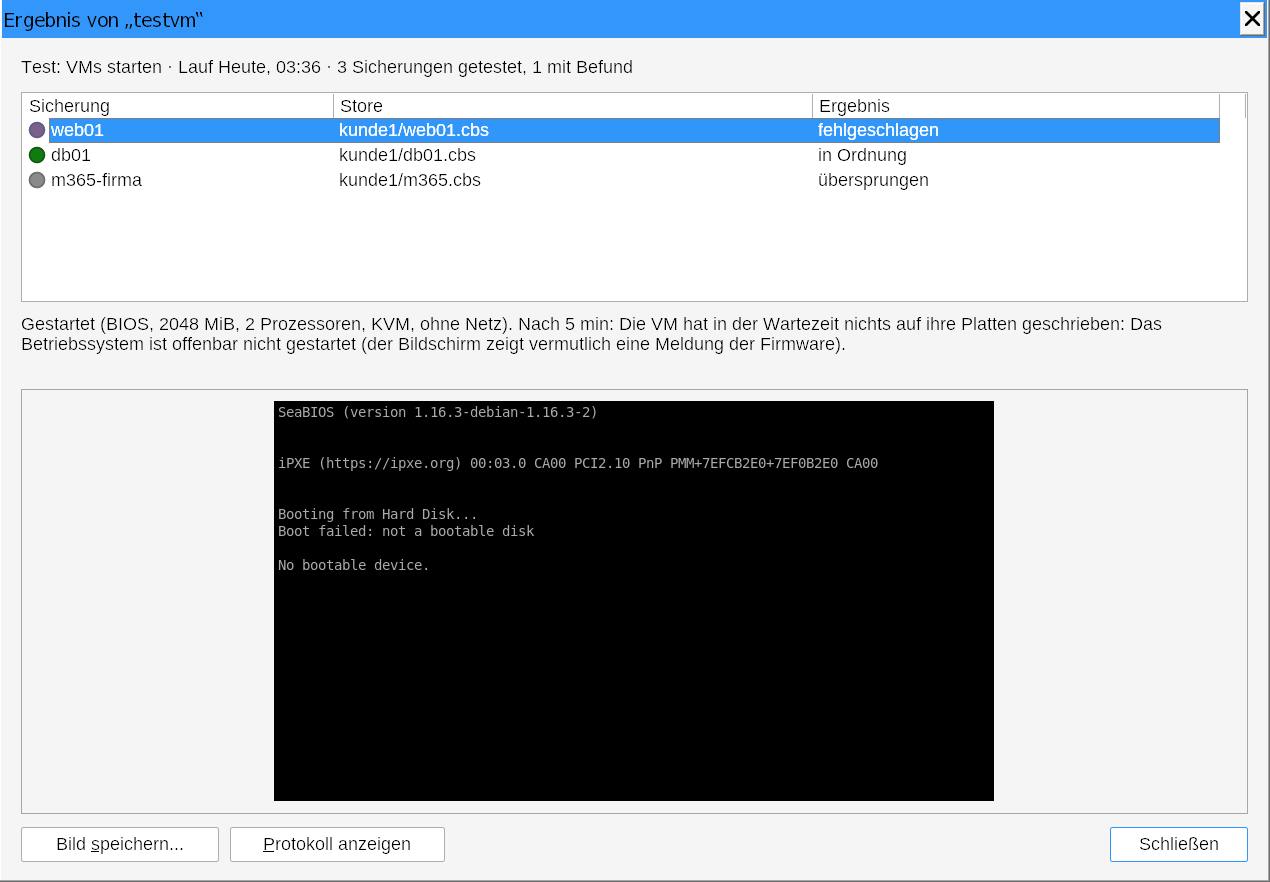
A check chain – the pruef-restore and the pruef-* jobs that follow it through after= – sends one check report as soon as its last step has finished and none is waiting any more (one minute after the last end). It starts with the verdict (“Passed” or the first finding) and shows a traffic-light table: one row per disk, partition and VM, one column per check (file system checked, mounted, counted, VM started) with “passed”, “finding”, “skipped” or “not checked”. The single steps of the chain no longer send a report of their own, but still their failure mail on an error. The mails have the mail kind pruefbericht: the operator gets the whole report, every customer the one of their own backups, with the screenshots of the VMs attached (together at most 5 MB per mail). The pictures are also next to the job log. In the target console a double click on a run of a test job opens the result with finding and screenshot; “Save picture...” saves it as a PNG.
Note: Hyper-V VMs start without their backed-up guest state (.vmgs, UEFI variables and vTPM); Windows starts all the same through the default boot path. Xen PV VMs that start a kernel of the Xen host, and single volumes without a partition table, cannot be started; the report names them as skipped.